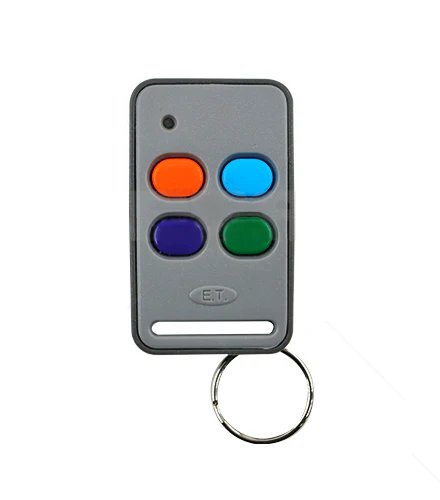

ET NICE TX4 REMOTE
✓ In Stock
Questions about this product? Call/WhatsApp +254 182 773 339 (Mon - Fri: 8:00 AM - 7:00 PM | Sat: 8:00 AM - 4:00 PM)
Description
📶 **ET Nice TX4 Remote
The ET Nice TX4 Remote is a 4-button wireless remote control used to operate gate motors, garage doors, electric locks, alarms, and other compatible automation systems. It uses secure rolling-code technology to transmit commands and prevent signal cloning.
📌 Key Features
-
4 Independent Buttons — Control up to four different functions (e.g., open/close, light on/off).
-
Rolling Code Security — Uses advanced ET-Blu Mix/rolling-code encryption so the signal changes every time to reduce cloning risk.
-
Wide Transmission Range — Typically up to 100 – 400 m in open spaces (range varies with environment).
-
Compact & Durable Design — Pocket-sized and robust for daily use.
-
LED Feedback — Some variants have LED indicators that confirm button transmission.
-
Battery-Powered — Uses a small replaceable coin cell battery for long life.
📊 Typical Specs
-
Channels: 4 button channels — each can send a distinct control command.
-
Frequency: ~433 MHz (or compatible band used by ET/Nice systems).
-
Technology: ET-Blu Mix / enhanced rolling code for secure signal transmission.
-
Compatibility: Works with ET/Nice rolling code receivers in gate motors, garage door motors, electric locks, and compatible automation systems.
-
Transmission Range: Approx. up to 100–150 m (varies by environment and receiver).
📍 What It’s Used For
-
Automatic Gate Openers – Operate sliding or swing gate motors from your vehicle or property entrance.
-
Garage Doors & Doors – Control your garage or automated entrance doors.
-
Security Systems – Switch alarms, electric locks, and lighting systems.
-
Multi-Device Control – Each button can be programmed to trigger different devices or commands.
🔧 Pairing & Use
-
Ensure the receiver/controller on your gate or system is compatible with ET/Nice rolling-code remotes.
-
Enter learn/programming mode on the receiver (see your gate controller manual).
-
Press the desired button on the TX4 to teach it to the receiver.
-
Test each button’s function after programming.
For pricing and availability in Kenya, visit:
👉 https://Jervamart.co.ke/